
Gateway API end-to-end on k0s with Envoy Gateway
A step-by-step walkthrough of installing Gateway API v1.5 and Envoy Gateway on k0s, and three curl tests that confirm routing works.
- Bharath Nallapeta
- 8 min read
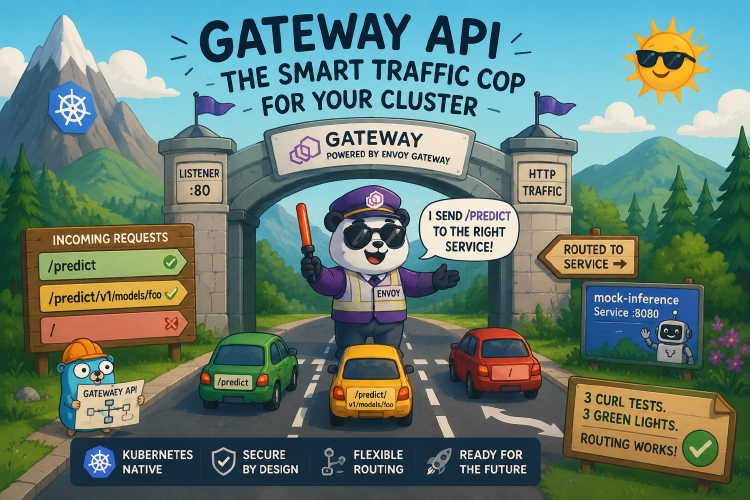
Gateway API is the successor to Kubernetes Ingress. It separates cluster-operator concerns (who installs the data plane, what listener ports it binds, which TLS certificates it holds) from application-developer concerns (which paths route to which Service, with what headers and weights). Most production Kubernetes deployments will run on it by the time Ingress v1beta1 is fully sunset.
Why is Gateway API replacing Ingress?
Ingress served as the de facto routing standard for years and covered straightforward host and path routing well. The friction surfaced with everything beyond that: controllers like ingress-nginx extended behavior through annotations and configuration snippets, which started as useful flexibility but accumulated as security exposure. When the Kubernetes community retired ingress-nginx in late 2025, the announcement put it plainly: “Yesterday’s flexibility has become today’s insurmountable technical debt.” Gateway API is the designated modern replacement, with advanced routing as first-class fields rather than annotations, and a role-oriented model that separates cluster-operator and application-developer concerns from the start.
This post is an end-to-end walkthrough on k0s 1.35: install the CRDs, install Envoy Gateway as the implementation, create a Gateway with an HTTPRoute, point it at a mock inference backend, and confirm the routing works with three curl requests. Two things tend to trip up first-time installs: the need for --skip-crds on the Envoy Gateway chart, and how to read Gateway status when there’s no cloud load balancer to assign an external IP. Both are covered.
A short Gateway API primer
There are three primary kinds in the gateway.networking.k8s.io API group:
| Kind | Owned by | Role |
|---|---|---|
GatewayClass | Platform team | Declares an installed implementation (Envoy Gateway, Istio, etc.) |
Gateway | Platform / app | An instance of that class: listeners, ports, TLS |
HTTPRoute | App team | “Send /predict to Service inference, port 8080” |
There’s also GRPCRoute, ReferenceGrant, and TCPRoute/UDPRoute/TLSRoute in the experimental channel. For this walkthrough we’ll stick to the standard channel, which is what the CNCF AI Conformance ai_inference requirement (and most real workloads) need.
Step 1: install the CRDs
The CRDs live in upstream’s release artifacts. Apply the standard channel manifest:
kubectl apply -f https://github.com/kubernetes-sigs/gateway-api/releases/download/v1.5.1/standard-install.yaml

kubectl api-resources | grep gateway.networking.k8s.io
# gatewayclasses     (gc)        gateway.networking.k8s.io/v1          false    GatewayClass
# gateways           (gtw)       gateway.networking.k8s.io/v1          true     Gateway
# grpcroutes                     gateway.networking.k8s.io/v1          true     GRPCRoute
# httproutes                     gateway.networking.k8s.io/v1          true     HTTPRoute
# referencegrants    (refgrant)  gateway.networking.k8s.io/v1beta1     true     ReferenceGrant
This is the part of the install that’s stable, predictable, and version-pinnable. The next step is where things have started getting interesting.
Step 2: install Envoy Gateway with --skip-crds
Envoy Gateway is one of several Gateway API implementations. We’re picking it because it’s a focused, small-footprint Envoy-only implementation that pairs cleanly with k0s. Helm chart at oci://docker.io/envoyproxy/gateway-helm. We used v1.7.2 for the AI conformance evidence cluster, which is what’s shown below; Envoy Gateway v1.8 (released May 2026) moved CRD management into a sub-chart, so --skip-crds semantics will look different there; re-read the release notes if you’re on v1.8+.
The install:
helm install eg oci://docker.io/envoyproxy/gateway-helm \
  --version v1.7.2 \
  --namespace envoy-gateway-system --create-namespace \
  --skip-crds \
  --wait --timeout 5m
--skip-crds is mandatory once Gateway API v1.5 is installed. The reason is a ValidatingAdmissionPolicy that Gateway API v1.5 introduced, called safe-upgrades.gateway.networking.k8s.io (confirmed in the v1.5 release notes), which:
- prevents downgrading Gateway API CRDs below v1.5 once v1.5 has been installed, and
- prevents installing Experimental-channel CRDs after Standard-channel ones are already in.
The Envoy Gateway v1.7.2 chart bundles its own copies of the Gateway API CRDs at a version older than v1.5. Helm’s CRD apply would, in effect, be a downgrade, and the VAP denies it. The secondary failure mode is a server-side-apply conflict on ReferenceGrant, since our Phase 1 install already owns those CRDs under SSA.
--skip-crds tells Helm to skip the chart’s crds/ directory entirely. The Envoy Gateway controller installs cleanly and uses our Phase 1 CRDs at runtime.
kubectl -n envoy-gateway-system get pods
# envoy-gateway-<hash>   1/1 Running
Step 3: create a GatewayClass
A subtle point about Envoy Gateway: the chart installs the controller, but doesn’t ship a default GatewayClass. Upstream convention is for the user to create one referencing the controller name:
apiVersion: gateway.networking.k8s.io/v1
kind: GatewayClass
metadata:
  name: eg
spec:
  controllerName: gateway.envoyproxy.io/gatewayclass-controller
kubectl apply -f gatewayclass.yaml
kubectl get gatewayclass eg
# NAME   CONTROLLER                                      ACCEPTED   AGE
# eg     gateway.envoyproxy.io/gatewayclass-controller   True       3s
ACCEPTED=True is the signal that the Envoy Gateway controller observed the class and is willing to back Gateways that reference it.
Step 4: a real Gateway, HTTPRoute, and backend
One manifest, four resources: the Gateway, an HTTPRoute that matches /predict, a Deployment serving a tiny JSON response, and a Service in front of it.
apiVersion: gateway.networking.k8s.io/v1
kind: Gateway
metadata:
  name: eg
spec:
  gatewayClassName: eg
  listeners:
    - name: http
      protocol: HTTP
      port: 80
---
apiVersion: gateway.networking.k8s.io/v1
kind: HTTPRoute
metadata:
  name: predict
spec:
  parentRefs:
    - name: eg
  rules:
    - matches:
        - path:
            type: PathPrefix
            value: /predict
      backendRefs:
        - name: mock-inference
          port: 8080
---
apiVersion: apps/v1
kind: Deployment
metadata:
  name: mock-inference
spec:
  replicas: 1
  selector: { matchLabels: { app: mock-inference } }
  template:
    metadata: { labels: { app: mock-inference } }
    spec:
      containers:
        - name: app
          image: hashicorp/http-echo:1.0.0
          args: ["-text", '{"prediction":0.87}', "-listen=:8080"]
          ports: [{ containerPort: 8080 }]
---
apiVersion: v1
kind: Service
metadata:
  name: mock-inference
spec:
  selector: { app: mock-inference }
  ports:
    - { port: 8080, targetPort: 8080 }
kubectl apply -f mock-inference-gateway.yaml
The Envoy Gateway controller observes the Gateway, provisions a data-plane Envoy pod in envoy-gateway-system, sets up listener config, and surfaces status on the Gateway and HTTPRoute resources.
Step 5: read the Gateway status correctly
This is where first-time installs often get confused. Look at the Gateway:
kubectl get gateway eg -o jsonpath='{.status}' | python3 -m json.tool
Inside .status.conditions, the top-level Programmed condition will be False with reason AddressNotAssigned. That’s expected in a no-LB environment. Gateway-level Programmed=True requires an address assigned by a cloud load balancer, which we don’t have on a self-managed k0s cluster.
The functional signal lives one level deeper, inside .status.listeners[].conditions:
kubectl get gateway eg -o yaml | grep -A20 'listeners:'
# - conditions:
#     - type: Accepted        ... status: "True"
#     - type: Programmed      ... status: "True"
#   name: http
Listener-level Programmed=True is the signal that the data plane is actually routing traffic. The top-level Programmed=False is bookkeeping for the missing external IP. If you wait on the top-level condition in a no-LB cluster, you’ll wait forever.
The Envoy data-plane pod and Service have a deterministic label scheme:
kubectl -n envoy-gateway-system get pods -l gateway.envoyproxy.io/owning-gateway-name=eg
kubectl -n envoy-gateway-system get svc -l gateway.envoyproxy.io/owning-gateway-name=eg
# One pod, one Service of type LoadBalancer with EXTERNAL-IP <pending>.
The EXTERNAL-IP being <pending> is the same no-cloud-LB story; the ClusterIP is what we’ll use.
Step 6: prove routing with three curls
Port-forward the Envoy Service to localhost. Three test cases, three distinct expected outcomes:
ENVOY_SVC=$(kubectl -n envoy-gateway-system get svc \
  --selector=gateway.envoyproxy.io/owning-gateway-name=eg \
  -o jsonpath='{.items[0].metadata.name}')

kubectl -n envoy-gateway-system port-forward "service/$ENVOY_SVC" 8888:80 &
sleep 3

# Test 1: matching prefix → 200 with backend body
curl -s http://localhost:8888/predict
# {"prediction":0.87}

# Test 2: non-matching path → 404 from Envoy
curl -s -o /dev/null -w "HTTP %{http_code}\n" http://localhost:8888/
# HTTP 404

# Test 3: sub-path of a PathPrefix match → still routes
curl -s http://localhost:8888/predict/v1/models/foo
# {"prediction":0.87}
Together those three signals show path-discriminated routing working correctly:
- The matching prefix returned the backend response body, so the request went through Envoy, matched the route, reached the backend, and the response came back.
- The non-matching path returned 404 from Envoy (not from the backend; the request never reached it).
- The sub-path under the prefix also matched, confirming PathPrefix semantics rather than PathExact.
If all three hold, the Gateway API install is doing what it should.
Common failure modes and how to read them
A handful of things go wrong consistently when people first wire this up:
helm installerrors withsafe-upgrades.gateway.networking.k8s.io ... denied request: ... downgrade: you forgot--skip-crds, or the chart you’re installing bundles older Gateway API CRDs. Retry with--skip-crds.helm installerrors withreferencegrants.gateway.networking.k8s.io ... Apply failed with N conflicts: server-side-apply collision; the chart’s CRDs collide with the Phase 1 CRDs. Retry with--skip-crds.- HTTPRoute condition
ResolvedRefs: False: thebackendRefs.namedoesn’t match any Service in the same namespace, or the Service exists in a different namespace and you forgot aReferenceGrant. curl /returns the backend response instead of 404: your HTTPRoute’s path match is being interpreted as/(match-all). Checkrules[].matches[].path.value.curl /predicthangs: the data-plane Envoy pod isn’t Ready.kubectl -n envoy-gateway-system get pods -l gateway.envoyproxy.io/owning-gateway-name=egshould show1/1 Running.
Wrap-up
The cluster now has a working Gateway API install: Envoy Gateway as the implementation, a GatewayClass, a Gateway with an HTTPRoute, a backend, and three different request shapes confirming the routing. This is the substrate for AI inference traffic management, A/B routing, header-based canaries, weighted backends, mTLS termination, and rate limiting: all things that Ingress couldn’t express cleanly.
Production extensions layer on top: add TLS by creating a Secret and a listener with protocol: HTTPS; add cross-namespace routing with ReferenceGrant; add GRPCRoute for gRPC backends; install the experimental channel CRDs if you need TCPRoute or TLSRoute. Each is a small additional manifest on top of what’s already here.
The --skip-crds quirk and the no-LB status reading are the two things that catch first-time installs. Once you’ve seen them, the rest of Gateway API on k0s is straightforward.
References
- Gateway API project site: official docs, conformance, and the standard/experimental channel split.
- Gateway API v1.5 release notes: confirms the
safe-upgrades.gateway.networking.k8s.ioVAP. - Envoy Gateway docs: install, configuration, status semantics.
- Envoy Gateway releases: including v1.8’s sub-chart CRD changes.
- HTTPRoute reference:
PathPrefixvsPathExactsemantics and fullmatchesshape. - Retiring ingress-nginx: the Kubernetes blog post announcing the retirement and recommending Gateway API as the migration path.