
k0s Joins NVIDIA AI Cluster Runtime with a Validated H200 Training Recipe
An upstream k0s recipe brings signed H200 validation evidence to NVIDIA AICR. Learn what was tested, its Preview limits, and how to use or contribute a recipe.
- Satyam Bhardwaj
- 4 min read
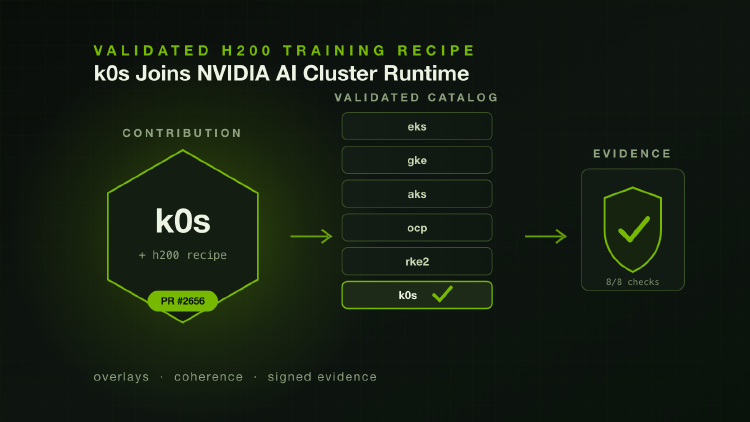
k0s now has an upstream training recipe in
NVIDIA AI Cluster Runtime (AICR). Merged on
September 10, 2026, PR #2656
adds the k0s / h200 / ubuntu / training combination, backed by signed
validation evidence.
- For platform teams, this provides a shared starting point for deploying a GPU stack on k0s.
- For open source contributors, it shows how a local integration can become a recipe others can inspect and reproduce.
The recipe is Preview. NVIDIA’s setup guide distinguishes it from Supported status: published validation does not imply full production support or lifecycle qualification.
Why We Contributed Upstream
A GPU stack depends on more than a working driver. The GPU Operator, container toolkit, resource allocation, and monitoring components must agree on versions and configuration. A cluster can report healthy while GPU pods fail because the toolkit configured the wrong container runtime.
AICR captures these choices in recipes: versioned component selections, configuration, and validation constraints for a particular environment. Before this contribution, resolving a k0s training recipe required a private data pack. The data pack let us test the integration without changing AICR, but it kept the fixes out of reach of other k0s users.
Contributing the reusable parts upstream gives k0s users a common place to review fixes and share validation results. It also makes the distinction between distribution defaults and local policy explicit. k0s’s containerd paths belong in the shared service overlay; whether a node image provides the NVIDIA driver belongs in the recipe for that environment.
k0rdent is now listed among AICR’s adopters. Its AICR catalog entry provides a Helm-based delivery path to managed clusters. Operators still need to select the recipe and validate it on their own fleet.
What Was Validated
The contribution separates configuration into three overlays: a k0s service root, a training layer, and an H200/Ubuntu training recipe. The service root points the NVIDIA container toolkit at k0s’s bundled containerd.
The H200 recipe assumes the node already has an NVIDIA driver. Four settings express that choice together: disable GPU Operator driver installation, point the DRA driver at the host filesystem, tell NVSentinel’s labeler the driver is installed, and disable its metadata collector. AICR’s driver-ownership coherence checks fail closed if they diverge.
The published validation run used k0s v1.36.3+k0s.0 on Ubuntu 24.04, with two H200 NVL GPUs passed through to a KubeVirt guest and NVIDIA driver 610.57.04. All eight deployment and conformance checks passed.
That evidence records a specific configuration and test run. The reference cluster had one node, so it did not establish multi-node NCCL bandwidth or long-duration hardware reliability. Those require tests on the target hardware and fabric.
Try the Upstream Recipe
Start with the k0s H200 setup guide. It covers Kubernetes and OS requirements, the preinstalled driver, storage, MIG defaults, and the Preview limitations. Use AICR v0.22.0 or newer, the first release with the k0s overlays, then resolve the full combination:
aicr recipe --service k0s --accelerator h200 --os ubuntu \
  --intent training --output recipe.yaml
This writes a recipe; it does not install the stack. Review its component versions and constraints before following the setup guide’s deployment path. The validation dashboard links the published evidence for this combination.
To verify the committed evidence pointers, run the following from an AICR source checkout using AICR v0.22.0 or newer:
for pointer in recipes/evidence/h200-k0s-ubuntu-training/*/*.yaml; do
  aicr evidence verify "$pointer" || break
done
Verification checks the evidence’s signature and integrity. It does not rerun the tests against your cluster.
Turn a Local Integration Into a Shared Recipe
If your platform is missing from the catalog, begin with a data pack and validate it on a representative cluster. Our companion private data pack walkthrough explains that development and delivery workflow.
When the integration is ready to share, follow AICR’s recipe development guide: separate reusable platform settings from site policy, run the relevant validation phases, publish signed evidence, and document what the test hardware can and cannot establish. Coordinate signer registration with the maintainers as part of the contribution.
The value of this contribution is a reviewable starting point. Configuration and validation results now sit in the same public project as the limits of what was tested. Use the recipe to reduce repeated integration work, then contribute evidence from your own environment to expand what the community can confidently rely on.