Running AI Workloads in Hardware-Isolated Sandboxes with k0s and Kata Containers
Learn why standard container isolation fails for agentic AI workloads, and how k0s plus Kata Containers closes the gap with hardware-enforced sandboxing
- Prashant Ramhit
- 10 min read
Introduction
Getting isolation right for AI workloads is deceptively involved. Your agent, your model server, your MCP server, and the host OS all share one Linux kernel by default. One prompt injection, one compromised model, one container escape CVE, and the failure isn’t silent, it’s a breach, and nothing in a standard Kubernetes namespace stops it from reaching every other workload on that node.
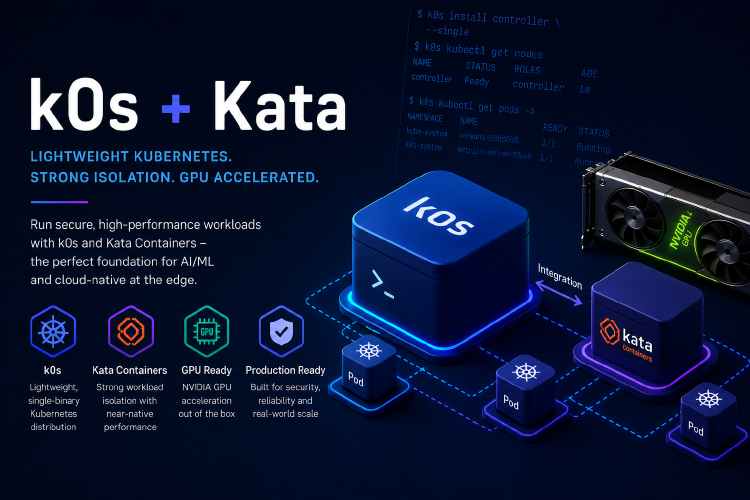
k0s plus Kata Containers makes hardware isolation tractable for this problem. k0s provides a single-binary Kubernetes distribution and is also available in a FIPS 140-3 capable edition. Kata replaces the container runtime with a lightweight hypervisor, so every pod gets its own kernel instead of borrowing the host’s.
In this post, we walk through why namespace-based isolation stops being sufficient once agents enter the picture, how Kata’s RuntimeClass mechanism gets you VM-level isolation with no application changes, and how k0s underneath it gives you a FIPS-compliant, air-gap capable control plane. The focus is the architecture that makes this deployable rather than a theoretical hardening exercise, backed by named CVEs it actually blocks.
Why Hardware Isolation for AI Workloads
Running agentic AI on Kubernetes changes the threat model in ways worth naming directly:
- Agents are not cooperative workloads. Namespace isolation was designed to separate deterministic services from each other. Agents are probabilistic, prompt-steerable, and wired into external tools, which is a different threat class entirely.
- The blast radius spans the whole toolchain. A compromised agent, model server, or MCP server can reach every other tenant sharing that kernel, not just its own pod.
- GPU co-tenancy adds attack surface. Kernel-level access to GPU driver interfaces creates side-channel risk that doesn’t exist for CPU-only workloads.
- Standard mitigations are soft boundaries. Namespaces, cgroups, RBAC, and network policy all assume the kernel itself is trustworthy. Once a workload escapes its container, those boundaries collapse.
- Kata closes the gap at the hardware layer. Replacing
runcwith a hypervisor gives every pod its own kernel, enforced in silicon by Intel VT-x or AMD-V, not by software convention.
Kata Containers plus k0s replaces what used to require custom sandboxing infrastructure with a RuntimeClass field in a pod spec. It’s the correct abstraction for this problem.
What This Architecture Assumes
Before going further, this stack assumes:
- A Kubernetes cluster running k0s (single node is sufficient to see the mechanics)
- Nodes with Intel VT-x or AMD-V enabled (required for the Kata hypervisor boundary)
kubectlconfigured for cluster access- An NVIDIA GPU node if you’re testing the passthrough path (tested against A100 and L4-class hardware in the original demo)
Installation instructions for k0s are in the official documentation. Kata installation and RuntimeClass setup are covered in the Kata Containers documentation.
Step 1: Understand Why Standard Isolation Fails
Standard Kubernetes isolation runs on four mechanisms, all operating above the kernel: namespaces, cgroups, RBAC, and network policy. These are useful, but they’re soft boundaries that assume the kernel is trustworthy and untampered. The moment a workload escapes its container and touches the host kernel, those boundaries stop meaning anything.
Three scenarios make this concrete for AI infrastructure:
- Prompt-injected agents with tool access. A crafted input can manipulate an agent into unintended actions. In a standard container, a clever exploit chains straight through a kernel vulnerability to the host.
- Compromised model servers. A third-party or fine-tuned model is, in any meaningful sense, an untrusted workload. If it’s compromised, or the weights themselves are tampered with, the shared kernel makes every other workload on that node reachable.
- Shared GPU clusters. Kernel-level access to GPU driver interfaces is attack surface that’s still being actively researched, and it doesn’t exist in CPU-only workloads.
Step 2: Swap runc for a Hypervisor with Kata Containers
Kata Containers replaces runc, the standard container runtime, with a hypervisor. Instead of launching a container process that shares the host kernel, it launches a lightweight VM. Your container runs inside that VM, with its own kernel, its own memory space, and a hardware boundary enforced by Intel VT-x or AMD-V at the CPU level.
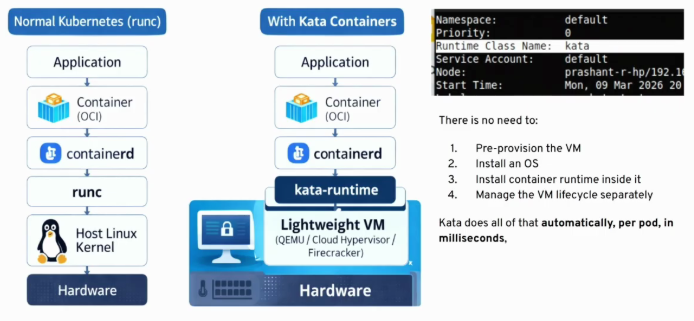
The stack comparison:
Standard runc:
  Application -> Container (OCI) -> containerd -> runc -> Host Linux Kernel -> Hardware

With Kata:
  Application -> Container (OCI) -> containerd -> kata-runtime -> Lightweight VM (QEMU / Cloud Hypervisor / Firecracker) -> Hardware
The application sees no difference. The host kernel sees nothing from inside the container, which is the entire point.
A single field routes a pod through Kata instead of runc:
apiVersion: v1
kind: Pod
metadata:
  name: sandboxed-agent
spec:
  runtimeClassName: kata
  containers:
  - name: agent
    image: your-agent-image:latest
No application changes, no new deployment tooling, the same kubectl apply workflow you already use.
What Happens Under the Hood
Tracing the execution flow demystifies the overhead concerns:
kubectl apply -f pod.yamlis submitted- kubelet reads
runtimeClassName: kata - containerd calls the kata-runtime shim
- kata-runtime reads
configuration.tomlfor memory, CPU count, kernel image, and rootfs - kata-runtime invokes the hypervisor directly
- The VM boots in roughly 100 to 500 milliseconds
- A kata-agent daemon starts inside the VM, and your container process runs inside that agent
Syscalls from your container hit the guest kernel, never the host kernel. From the pod’s perspective, the host kernel’s attack surface is effectively zero. Swap in Firecracker as the hypervisor backend and boot time drops under 125 milliseconds, which matters for latency-sensitive scheduling.
Step 3: Keep GPU Passthrough Inside the Kata VM
The question that usually kills this architecture before it starts: if the model server runs inside a VM, does it lose direct hardware access to the GPU?
It doesn’t, through VFIO (Virtual Function I/O), the Linux kernel framework for direct device assignment to VMs.
apiVersion: v1
kind: Pod
metadata:
  name: cuda-vectoradd-kata
spec:
  runtimeClassName: kata-qemu-nvidia-gpu
  containers:
  - name: cuda-workload
    image: nvcr.io/nvidia/k8s/cuda-sample-vectoradd:cuda11.7.1-ubuntu20.04
    resources:
      limits:
        nvidia.com/gpu: 1
  annotations:
    io.katacontainers.config.hypervisor.default_memory: "16384"
The QEMU/KVM operator, installed as a Kubernetes operator, handles VFIO device assignment automatically. The Kata VM gets exclusive, direct access to a specific physical GPU, no virtualized GPU layer, no performance penalty. CUDA workloads run at full hardware speed inside the isolation boundary.
Step 4: Verify What Kata Actually Blocks
This is where the architecture stops being theoretical. A CVE table covering eleven vulnerabilities from 2024 and 2025 shows full mitigation under Kata across the board. A few worth naming directly:
| CVE | Year | CVSS | Category | Kata blocks? |
|---|---|---|---|---|
| CVE-2024-23653 | 2024 | 9.8 | BuildKit RCE | Full |
| CVE-2025-23359 | 2025 | 9.0 | NVIDIA TOCTOU bypass | Full |
| CVE-2024-21626 | 2024 | 8.2 | runc fd leak (“Leaky Vessels”) | Full |
| CVE-2025-52081 | 2025 | 7.3 | runc/procfs privilege escalation | Full |
The pattern holds because every runc-class vulnerability is blocked by the simple fact that Kata replaces runc entirely. There’s no runc anywhere in the execution path, only a hypervisor boundary, so attacks depending on manipulating the container runtime, escaping through procfs, or exploiting NVIDIA driver hooks in the host kernel have no surface left to reach from inside the VM.
Verify the isolation properties directly on a running node:
# Confirm the pod is scheduled under the kata RuntimeClass
kubectl get pod sandboxed-agent -o jsonpath='{.spec.runtimeClassName}'

# Confirm the guest kernel is distinct from the host kernel
kubectl exec sandboxed-agent -- uname -r
uname -r
If those two kernel versions differ, or the guest kernel is a Kata-provided image rather than your host’s kernel, the isolation boundary is active.
Step 5: Add k0s as the FIPS-Compliant Foundation
Kata handles pod-level isolation. The distribution running the cluster underneath it matters just as much for regulated AI deployments.
k0s is a single-binary Kubernetes distribution, donated to open source by Mirantis and now a CNCF Sandbox project. The properties that matter here:
- FIPS 140-3 compliance. The current, more stringent FIPS standard, with rigorous testing across all cryptographic operations. Required for government, defense, and much of financial services.
- Single-binary architecture. The entire control plane and worker runtime ship as one artifact, which shrinks attack surface and cuts supply chain dependencies.
- Air-gapped installation. No internet access required during setup or operation, often a hard requirement for sovereign deployments and network-isolated edge clusters.
- Windows native worker support. Hybrid Linux and Windows clusters without separate tooling, for teams migrating legacy workloads.
Standing up a cluster is three commands:
# Install k0s
curl -sSLf https://get.k0s.sh | sudo sh

# Configure as single-node controller
k0s install controller --single

# Start the cluster
k0s start
Under three minutes, kubectl get nodes shows a ready control-plane node, no cloud infrastructure required.
Step 6: Put the Complete Stack Together
The synthesis, once both pieces sit side by side:
- k0s supplies the FIPS-compliant, upstream-conformant, air-gap-capable control plane.
- Kata Containers supplies VM-level hardware isolation per pod, so every agent, model server, or MCP server gets its own kernel and memory space.
- GPU passthrough via the QEMU/KVM operator gives inference workloads direct, exclusive access to physical GPU cores inside the Kata VM, full hardware performance with no shared-kernel risk.
The threat model this post opened with, agents, LLMs, MCP servers, and plugins co-tenanted alongside sensitive PII, financial, and medical data, gets addressed at the hardware layer instead of the namespace layer.
Troubleshooting and Operational Gaps
VM resources won’t tune at runtime
Kata locks resource allocation at hypervisor invocation time based on configuration.toml, not at runtime. Tuning memory or CPU for a specific workload class means a separate RuntimeClass with different configuration, not an in-place adjustment.
cat /etc/kata-containers/configuration.toml
Plan your RuntimeClass taxonomy per workload type before you have production traffic depending on it.
Boot latency compounds under auto-scaling
A 100 to 500 millisecond VM boot is fast for most workloads, but it compounds across replicas if you’re auto-scaling inference in response to traffic. Firecracker’s sub-125-millisecond boot helps considerably. Pre-warming may still be necessary at high scale.
GPU passthrough isn’t universal
The VFIO path needs the QEMU/KVM operator and specific NVIDIA driver versions, and not every GPU model has equal passthrough support.
nvidia-smi | grep "Driver Version"
Validate your specific GPU hardware against the Kata compatibility matrix before committing this to production.
The hypervisor host is still a host
Kata isolates pods from each other and from the host kernel, but the hypervisor itself runs on that host. A QEMU escape or KVM exploit is still a host-level compromise. Kata is one layer of defense in depth, not the only one.
eBPF-based observability breaks silently
Many standard Kubernetes observability tools, eBPF profilers, syscall tracers, some CNI plugins, rely on host-kernel visibility into pod processes. That visibility is broken by design inside a Kata VM. Plan your observability stack alongside your isolation architecture, not after.
Use Cases
Hardware-isolated AI on k0s and Kata is well suited for:
- Multi-tenant inference platforms where different customers’ models and agents run on shared nodes with no path between their kernels
- Regulated AI deployments requiring FIPS 140-3 certification for government, defense, or financial services workloads
- Agent and MCP server sandboxing where tool-calling agents need a hardware boundary against prompt injection and compromised dependencies
- Air-gapped and sovereign environments where k0s ships as a single binary and offline deployment is a hard requirement
- Shared GPU clusters where VFIO passthrough gives each tenant exclusive, isolated access to physical GPU cores
Conclusion
Put simply: a RuntimeClass field and a FIPS-compliant control plane get you hardware-enforced isolation for every agent, model server, and MCP server in your cluster, no application changes required. k0s handles the distribution layer. Kata handles the pod-level isolation. Together they close the kernel-sharing gap that namespace isolation was never built to handle.
That covers the hardware isolation foundation. It doesn’t cover the network trust problem, an agent running safely inside a Kata VM can still make network calls to other services, and those calls can still be manipulated. Zero trust networking, agent gateways, and service mesh policy between agents and MCP servers is a separate, and bigger, layer of this problem. We cover it in Part 2.
Resources
- Kata Containers Documentation
- k0s Documentation
- k0s Runtime Documentation
- K0RDENT Documentation
- Agents, MCP, and Kubernetes, Part 2: Zero Trust Network Architecture
- NVIDIA GPU Operator Getting Started
Tags: Kubernetes · Kata Containers · k0s · AI Infrastructure · Security · Zero Trust · GPU · FIPS · Multi-Tenancy · LLM Ops