
Deploy and Validate GPU Stacks With NVIDIA AICR Data Packs
Package GPU stack configuration as an AICR data pack, deploy it through Helm, and retain verifiable validation evidence. A practical k0s/H200 walkthrough.
- Satyam Bhardwaj
- 8 min read
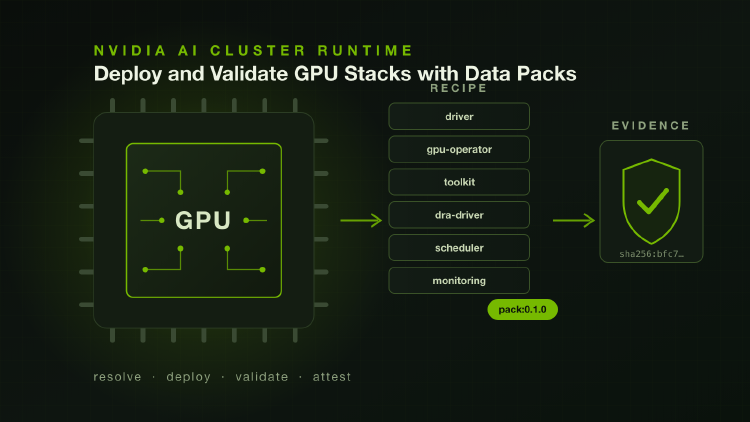
A GPU cluster is difficult to reproduce when component versions live in one place and installation exceptions live in another. The next operator needs to know which driver to use, who installs it, and which containerd instance the NVIDIA toolkit should configure.
NVIDIA AI Cluster Runtime (AICR) captures a GPU stack as a recipe. A data pack extends that recipe catalog with your own configuration and components, and can carry additional validation rules. Publishing the pack as a versioned OCI artifact gives a team a common input to review and deploy.
This walkthrough uses a k0s/H200 example and the nvidia-aicr Helm chart to resolve a recipe, install its components, check the result, and retain evidence. The nvidia-aicr Helm chart is maintained by Mirantis; AICR itself is an open source NVIDIA project.
Understand the Workflow
There are three artifacts to keep distinct:
| Artifact | Purpose |
|---|---|
| Data pack | Your additions and overrides to AICR’s embedded catalog. |
| Resolved recipe | The component selection and constraints produced from the catalog, pack, and requested criteria. |
| Evidence bundle | The recipe, cluster snapshot, validation results, software bill of materials, and integrity metadata from a run. |
AICR selects recipes using service, accelerator, os, intent, and
platform. The Helm chart runs the CLI in a Kubernetes Job: it pulls the
pack, resolves the recipe, renders and verifies a deployment bundle,
installs it, and optionally validates the cluster.
The Job runs once per release revision. A GitOps controller can deliver the chart across a fleet, but neither continuously checks the installed GPU stack for drift. Run validation again when you need a fresh verdict.
Choose the Right Starting Point
Our original pack supplied service: k0s before AICR included it upstream.
k0s now has a Preview H200/Ubuntu training recipe.
If that recipe matches your environment, start there. Use a private pack
when you need site-specific settings, internal components, or additional
validators.
The example below explains the original pack workflow. It uses the
chart’s v0.2.0
with pinned AICR v0.20.0
and omits os, matching that pack’s criteria. It is a different selection from the full upstream k0s/h200/ubuntu/training
combination. When changing AICR versions, review which embedded overlays
now match alongside your private ones.
Before starting, have:
- A k0s cluster with H200 GPUs, Kubernetes 1.34 or newer, and a compatible NVIDIA driver already installed on each GPU node.
- Cluster-admin access through
kubectl, plus Helm, ORAS,jq, and the AICR CLI on your workstation. Use the same AICR version locally as the chart uses. - Access from the cluster to GitHub releases and the required chart and image registries.
- An OCI repository for the pack, with push access locally and pull credentials available to the cluster.
The chart’s installer ServiceAccount has cluster-admin permissions because it installs cluster-scoped resources. Test on a representative cluster before rolling the configuration out to a fleet.
1. Prepare and Inspect the Pack
Use packs/k0s-h200-training/
in a checkout of the chart repository as the starting point. A pack needs a
registry.yaml and an overlays/ directory:
packs/k0s-h200-training/
├── registry.yaml
└── overlays/
    └── k0s-h200-training.yaml
When the pack adds no components, the registry is an empty extension:
apiVersion: aicr.run/v1alpha2
kind: ComponentRegistry
components: []
The overlay selects the environment and overrides component values. This excerpt shows the container runtime configuration; use the complete pack linked above for the rest of the settings:
apiVersion: aicr.run/v1alpha2
kind: RecipeMetadata
metadata:
  name: k0s-h200-training
spec:
  criteria:
    service: k0s
    accelerator: h200
    intent: training
  constraints:
    - name: K8s.server.version
      value: ">= 1.34"
  componentRefs:
    - name: gpu-operator
      type: Helm
      overrides:
        toolkit:
          enabled: true
          env:
            - name: CONTAINERD_CONFIG
              value: /etc/k0s/containerd.d/nvidia.toml
            - name: CONTAINERD_SOCKET
              value: /run/k0s/containerd.sock
            - name: CONTAINERD_RUNTIME_CLASS
              value: nvidia
Those paths matter because k0s runs its own containerd. Configuring the
distribution’s default containerd can leave GPU pods failing with
no runtime for "nvidia" is configured.
Driver ownership is a separate choice. The complete example disables GPU
Operator driver installation, sets the DRA driver’s nvidiaDriverRoot: /,
and tells NVSentinel’s labeler the driver is already installed. The newer
upstream k0s recipe also disables NVSentinel’s metadata collector. Keep
these settings consistent with the AICR version you use; do not copy only
one driver override into a different recipe.
The pack also makes local choices about MIG, RDMA, and storage support. Review those against your hardware. They are not defaults that every k0s cluster should inherit.
Resolve the pack locally before publishing it:
aicr recipe --service k0s --accelerator h200 --intent training \
  --data ./packs/k0s-h200-training --output recipe.yaml
Inspect recipe.yaml for the expected components, versions, constraints,
and applied overlays. Resolution confirms the configuration can be
assembled; cluster validation comes later. See AICR’s
data extension guide
for matching and override rules.
2. Publish the Pack
Authenticate ORAS to your registry, replace <org> with your registry
owner, then publish from the pack directory:
oras login ghcr.io
(
  cd packs/k0s-h200-training || exit
  oras push ghcr.io/<org>/aicr-packs/k0s-h200-training:0.1.0 .
)
Record the returned digest. Tags are convenient during development; use
ghcr.io/<org>/aicr-packs/k0s-h200-training@sha256:<digest> in rollout
values when you need an immutable reference. Review the chart version,
AICR version, and pack digest together: the pack extends the catalog shipped
with that AICR binary.
For a private pack, create the aicr namespace and create a
kubernetes.io/dockerconfigjson Secret named aicr-pack-pull there before
installation. The chart’s registry instructions
cover manual and fleet delivery. For a public pack, omit dataPackSecret.
3. Install and Check the Result
Save the following as values-k0s-h200.yaml, substituting your pack reference:
service: k0s
accelerator: h200
intent: training
dataPack: "ghcr.io/<org>/aicr-packs/k0s-h200-training:0.1.0"
dataPackSecret: "aicr-pack-pull"

deploy:
  enabled: true
deployFlags: "--retries 1"
validate:
  enabled: true
  phases: [deployment]
  failOnError: true
deployFlags replaces the chart’s best-effort, no-wait defaults: deployment
waits for components, and failures fail the Job. validate.failOnError
makes a failed validation fail the Job after its result has been captured.
helm install nvidia-aicr oci://ghcr.io/mirantis/charts/nvidia-aicr \
  --version 0.2.0 \
  --namespace aicr --create-namespace \
  -f values-k0s-h200.yaml

kubectl logs -n aicr -l app.kubernetes.io/name=nvidia-aicr --tail=-1 -f
If GPU nodes are tainted, configure tolerations for both the installed components and, when needed, the installer Job. The chart documents these as separate settings.
After the run, inspect what resolved and what passed:
kubectl get cm aicr-recipe -n aicr -o jsonpath='{.data.summary\.txt}'
criteria: service=k0s accelerator=h200 os= intent=training platform=
dataPack: ghcr.io/<org>/aicr-packs/k0s-h200-training:0.1.0
recipe generation completed: output=./recipe.yaml components=11 componentNames=cert-manager, gpu-operator, k8s-ephemeral-storage-metrics, kai-scheduler, kube-prometheus-stack, nfd, nodewright-operator, nvidia-dra-driver-gpu, nvsentinel, prometheus-adapter, prometheus-operator-crds overlays=4
This ConfigMap matters because AICR resolves exactly what you state, and fewer criteria resolve to a smaller component set. The summary shows the criteria used, the overlay count, and the sorted component list, so you can confirm the resolved stack matches what you intended.
Then check what passed:
kubectl get cm aicr-validate-result -n aicr -o jsonpath='{.data.ctrf\.json}' \
  | jq '.results.summary, (.results.tests[] | {name, status})'
An earlier lab run recorded four passing deployment checks:
operator-health       passed
expected-resources    passed
gpu-operator-version  passed
check-nvidia-smi      passed
These results cover the selected deployment checks, including component
health assertions, the GPU Operator version constraint, and nvidia-smi
on the GPU node. They do not establish training throughput or sustained
hardware reliability. Read skipped and inconclusive results as well as the
pass count; a skipped benchmark provides no performance evidence.
If the recipe is wrong, revisit its criteria and matching overlays. If the Job fails before validation, inspect its logs and pod events; there may be no verdict ConfigMap yet. Do not change chart values while an installation is running: a new release revision can terminate the previous Job.
4. Retain Verifiable Evidence
ConfigMaps make results easy to inspect on the cluster. An evidence bundle lets another engineer review the run without access to that cluster.
For a run that must retain evidence, extend the existing validate block
before installation. These values preserve the validation gate and make
publication failure fail the Job too:
validate:
  enabled: true
  phases: [deployment]
  failOnError: true
  emitEvidence: true
  publish:
    enabled: true
    mode: unsigned
    ref: ghcr.io/<org>/aicr-evidence
    registrySecret: "aicr-evidence-push"
    failOnError: true
Provision aicr-evidence-push as a dockerconfigjson Secret in aicr with
push access to the evidence repository. unsigned publishes the bundle
without a signing identity in the installation pod. Registry credentials
are still required.
After publication, save the pointer and sign it from a trusted workstation using the chart’s evidence workflow:
kubectl get cm aicr-evidence-bundle -n aicr \
  -o jsonpath='{.data.pointer\.yaml}' > pointer.yaml

aicr evidence sign pointer.yaml --relocate
Signing requires registry access and a supported Sigstore identity. Use the
signed pointer emitted by that command with aicr evidence verify.
The pointer identifies the bundle by digest; verification checks its
signature and recorded integrity metadata. An unsigned bundle can establish
internal consistency, but cannot authenticate who produced it.
The chart also verifies the AICR release checksum and the rendered bundle’s checksums before deployment. Those checks detect changed bytes; they do not prove that a private pack is suitable for your hardware. Review the pack and validate the resulting configuration on the target cluster.
Make the Result Repeatable
Start with one representative cluster. Review the resolved recipe, require a passing deployment verdict, and retain the evidence before expanding to a fleet. Pin the inputs that produced that result, then deliver the same values through Helm, Flux, Argo CD, or k0rdent.
For a later drift check, run the chart with deploy.enabled: false and
validation enabled. It checks the existing cluster against the resolved
recipe without reinstalling the stack. Schedule those runs explicitly;
one successful installation is not an ongoing health guarantee.
The useful outcome is a traceable record: the configuration you intended and the checks you ran, tied to the result on a particular cluster. That makes upgrades easier to review and failures easier to investigate. When a local integration becomes reusable, the k0s upstream contribution shows how to share it with evidence and clear limits.